 how-to
Affordable Indoor Golf Near Me: A How-To Guide
Table of Contents
- How to Find Affordable Indoor Golf Facilities Near You
- Comparing Costs: What to Expect at Local Indoor Golf Centers
- Best Indoor Golf Simulator for Practice: What Makes Trackman Stand Out
- How to Use Golf Simulator Data to Improve Your Game
- Building Your Indoor Golf Practice Routine for Maximum Results
- Ways to Keep Your Simulator Sessions Affordable
- Booking and Access: Pay-as-You-Go vs. Memberships
- Frequently Asked Questions
Last Updated: October 7, 2026
How to Find Affordable Indoor Golf Facilities Near You
Finding affordable indoor golf near me doesn't have to mean compromising on quality or simulator accuracy. The key is knowing what to look for and understanding how different facilities structure their pricing models. At SVN2 Indoor Golf, we've helped countless golfers discover how to practice smarter without breaking the bank.
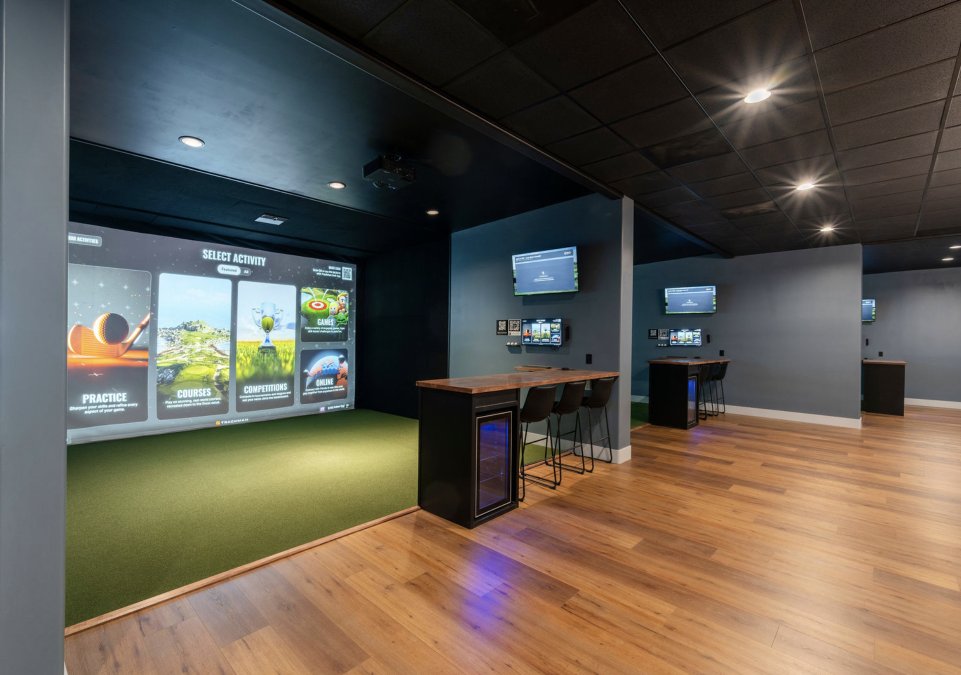
Start by identifying facilities within your area that offer pay-as-you-go options rather than requiring expensive memberships upfront. Many golfers overlook this distinction, assuming all indoor golf centers operate the same way. They don't. Some facilities lock you into annual contracts, while others let you book simulator time on demand, paying only for the hours you use.
When evaluating options, ask about peak versus off-peak pricing. Most indoor golf centers charge different rates depending on the time of day and day of the week. A session during lunch hours or weekday afternoons typically costs less than evening or weekend slots. This single factor can cut your per-hour cost significantly if you have scheduling flexibility.
Look for facilities that provide transparent pricing upfront. You should know the exact cost per hour before you book, not discover hidden fees at checkout. The best facilities publish their rates clearly on their website and answer questions about pricing via phone or email without hesitation.
Comparing Costs: What to Expect at Local Indoor Golf Centers
When you're comparing affordable indoor golf options, understanding the cost structure matters as much as the hourly rate itself. Different facilities calculate pricing differently, so apples-to-apples comparison requires knowing what's included in each quote.
Most indoor golf centers charge by the hour or by the bay. A bay is a single simulator station where you hit golf balls and see your shots displayed on a screen. Some facilities charge per person, others per bay. If you're bringing friends, per-bay pricing might be more economical than per-person rates, especially for groups of three or more.
Ask whether your cost includes access to the simulator data. At SVN2 Indoor Golf, every session gives you detailed swing metrics and ball flight information. Not all facilities include this level of analysis in their base rate. Some charge extra for premium data breakdowns, while others include it automatically.
Consider what happens if you need to cancel or reschedule. Some facilities charge cancellation fees or don't refund unused time. Others offer flexible rescheduling without penalty. These policies directly affect the true cost of your practice sessions, especially if your schedule varies week to week.
Peak-time pricing can double or triple the cost compared to off-peak hours. If you can practice during midweek mornings or early afternoons, you'll pay significantly less than evening or Saturday golfers. This is one of the most straightforward ways to keep simulator sessions affordable.
Best Indoor Golf Simulator for Practice: What Makes Trackman Stand Out
The simulator technology behind your practice sessions determines whether your training translates to real-world improvement. Trackman simulators represent the gold standard in launch monitor accuracy, and understanding why matters for your practice investment.
Trackman uses advanced radar technology to capture every detail of your swing and ball flight (Trackman 4 & Trackman iO Technical Specifications). It measures clubhead speed, ball speed, launch angle, spin rate, and shot shape with remarkable precision. This data accuracy is critical because if your simulator shows incorrect distances or trajectories, you're training your swing based on false information.
When you're evaluating a facility's simulator quality, ask about the specific equipment they use. Trackman simulators come in different generations, and newer versions offer more detailed metrics than older models. The facility should be transparent about their equipment and willing to explain what data points they track.
The difference between accurate and inaccurate simulators becomes obvious over time. A golfer practicing with poor simulator data might think they've improved their swing when they've actually developed bad habits. Conversely, accurate simulators like Trackman give you reliable feedback that you can trust and apply to your actual game.
SVN2 Indoor Golf uses state-of-the-art Trackman simulators specifically because we believe your practice time deserves accurate information. When you're paying for simulator time, you're investing in data-driven improvement. Anything less is wasting both your money and your effort.
How to Use Golf Simulator Data to Improve Your Game
Your simulator provides a wealth of data after every shot. The question is how to interpret it and use it to make meaningful improvements to your swing.
Start with the fundamentals: clubhead speed, ball speed, and launch angle. These three metrics tell you whether you're generating enough power and hitting the ball at the optimal angle for distance. If your clubhead speed is lower than your target, you know to focus on swing tempo and acceleration.
Spin rate is equally important. Too much spin on your driver costs you distance. Too little spin on your irons means the ball won't hold the green. Trackman simulators show your spin rate for every club, allowing you to diagnose whether your technique is creating the right amount of rotation.
Distance gapping reveals whether your clubs are properly spaced. Ideally, each club should produce a consistent distance gap from the next club. If your 6-iron and 7-iron produce nearly identical distances, you have a gapping problem that needs correction. Simulator data makes this immediately obvious.
Use your simulator sessions to dial in specific yardages. Many golfers think they know how far they hit each club, but actual distances often differ from assumptions. Spend time at the simulator confirming your true distances for every club in your bag.
Building Your Indoor Golf Practice Routine for Maximum Results
Effective practice at an indoor golf facility requires structure. Random hitting produces random results. A deliberate practice routine produces measurable improvement.
Begin each session with a warm-up. Hit a few shots with different clubs to get a feel for the simulator and check your baseline metrics. This isn't wasted time, it's a reference point for comparing your performance as the session progresses.
Structure your practice around specific goals. One session might focus on distance gapping. Another might concentrate on improving your short iron accuracy. A third might emphasize dialing in your driver consistency. When you have a clear target for each session, you're more likely to make progress.
Use the simulator's course simulation features when available. Playing simulated rounds on real courses helps you practice under pressure and develop course management skills. It's different from hitting isolated shots because you must think strategically about club selection and shot placement.
Dedicate time to your weakest areas. If your driver is unreliable, spend half your session working on driver consistency. If your short irons lack accuracy, focus there.
Record your session data. Most facilities provide a summary of your metrics after each visit. Save these records and compare them over time. Seeing improvement in your numbers provides motivation and proof that your practice is working.
Ways to Keep Your Simulator Sessions Affordable
Beyond choosing off-peak hours, several strategies reduce the cost of regular simulator practice.
Group sessions distribute the cost across multiple people. If your facility charges per bay, bringing three friends means you're splitting the cost four ways. This approach works especially well for casual golfers who want to practice with their regular playing partners.
Look for introductory rates or first-time visitor discounts. Many facilities offer reduced pricing for new customers. If you're trying a facility for the first time, ask about new-customer specials.
Punch passes provide discounts when you commit to multiple sessions upfront. Instead of paying full price per session, you purchase a pass for ten or twenty hours at a reduced rate. This works well if you know you'll visit regularly.
Community memberships sometimes offer affordable access. Some facilities provide discounted rates for students, faculty, first responders, seniors, and veterans. If you fit any of these categories, ask what discounts are available. SVN2 Indoor Golf offers community memberships specifically designed to make simulator access affordable for these groups.
Practice during slow periods. Tuesday mornings or Wednesday afternoons typically see lower demand than Friday evenings or Saturday mornings. Facilities often charge less during these quieter times to encourage usage.
Combine your practice with friends who want to improve. Splitting bay rental costs with partners makes each person's investment smaller while maintaining the quality of your practice environment.
Booking and Access: Pay-as-You-Go vs. Memberships
Understanding your access options helps you choose the model that fits your schedule and budget.
Pay-as-you-go facilities let you book simulator time whenever you want without long-term commitment. You pay for each session individually, typically per hour or per bay. This model works best if your schedule varies or you're not sure how frequently you'll practice.
Memberships require upfront payment for unlimited or limited access over a specific period. Monthly memberships typically offer unlimited simulator time within that month. Annual memberships provide the lowest per-hour cost if you practice regularly. The trade-off is that you're committed financially whether you use the facility or not.
For most golfers, pay-as-you-go makes sense initially. You can try the facility, confirm you enjoy the experience, and understand your realistic practice frequency before committing to a membership. Many golfers overestimate how often they'll practice and end up with unused membership time.
If you determine you'll visit more than once or twice monthly, membership pricing often becomes more economical than pay-as-you-go rates. Calculate the break-even point for your facility.
SVN2 Indoor Golf's pay-as-you-go model gives you flexibility to practice on your schedule without membership obligations. Book simulator time when it fits your life, pay only for the hours you use, and access the same state-of-the-art Trackman technology and detailed swing analysis that serious golfers depend on.
Finding affordable indoor golf near me comes down to understanding your options and matching them to your practice needs. Whether you're a 15-handicap golfer looking to break through a plateau or someone returning to the game after years away, simulator practice offers data-driven improvement that translates to real results on the course.
| Access Model | Best For | Cost Structure |
|---|---|---|
| Pay-as-you-go | Irregular schedules, first-time visitors | Hourly rate, no commitment |
| Group sessions | Social golfers, cost-sharing | Per-bay rate split across people |
| Community discounts | Students, seniors, first responders, veterans | Reduced rates based on membership category |
Frequently Asked Questions
How accurate are Trackman simulators compared to real golf courses?
Trackman technology captures over 20 data points per swing, including ball speed, launch angle, and spin rate, delivering accuracy that translates directly to on-course performance. The simulator uses real golf course topography and conditions, so the practice you do at the facility mirrors what you'll experience outdoors. Golfers who dial in their yardages and swing mechanics using Trackman data consistently see improvement when they play on actual courses.
Can beginners use indoor golf simulators, or is this only for serious golfers?
Indoor golf simulators work for every skill level. Beginners benefit from seeing immediate feedback on club distances and swing mechanics without the pressure of a crowded range. The self-service format means you can practice at your own pace, and the detailed swing data helps you understand what's happening in your swing so you can make real improvements. Whether you're returning to golf after years away or just starting out, the facility accommodates your needs.
What's the best way to use golf simulator data to actually improve my game?
Start by establishing baseline measurements for each club in your bag. Use multiple sessions to identify patterns in your swing, such as consistency in distance, launch angle, or spin rate. Focus on one specific area each session, whether that's club distance gaps, shot shape, or swing tempo. Track your progress over weeks and months to see measurable improvement. The detailed breakdown from the simulator gives you concrete targets to work toward, rather than guessing what needs adjustment.
Do I need to book simulator time in advance, or can I just walk in?
Booking in advance is recommended to ensure bay availability, especially during peak times. The pay-as-you-go model offers flexibility for your schedule, so you can reserve time that fits your availability. Check current availability and reserve your session online to avoid wait times and guarantee your practice window. Walk-ins may be accommodated depending on facility capacity, but booking guarantees you get the time slot you need.